
Configure Currencies in BetterCommerce
Overview
The Currency Configuration feature in BetterCommerce enables administrators to manage multi-currency support by enabling or disabling specific currencies for a project (e.g., betterstore). This functionality ensures accurate pricing, localized customer experiences, and streamlined financial operations across storefronts, order management systems, and pricing modules.
Accessing the Currency Configuration Interface
-
Log in to BetterCommerce
Navigate to pim2.bettercommerce.io using your enterprise credentials to access the Product Information Management (PIM) system. -
Navigate to the Currencies Section
From the main dashboard, go to the Settings menu and select Currencies. This will open the currency configuration interface.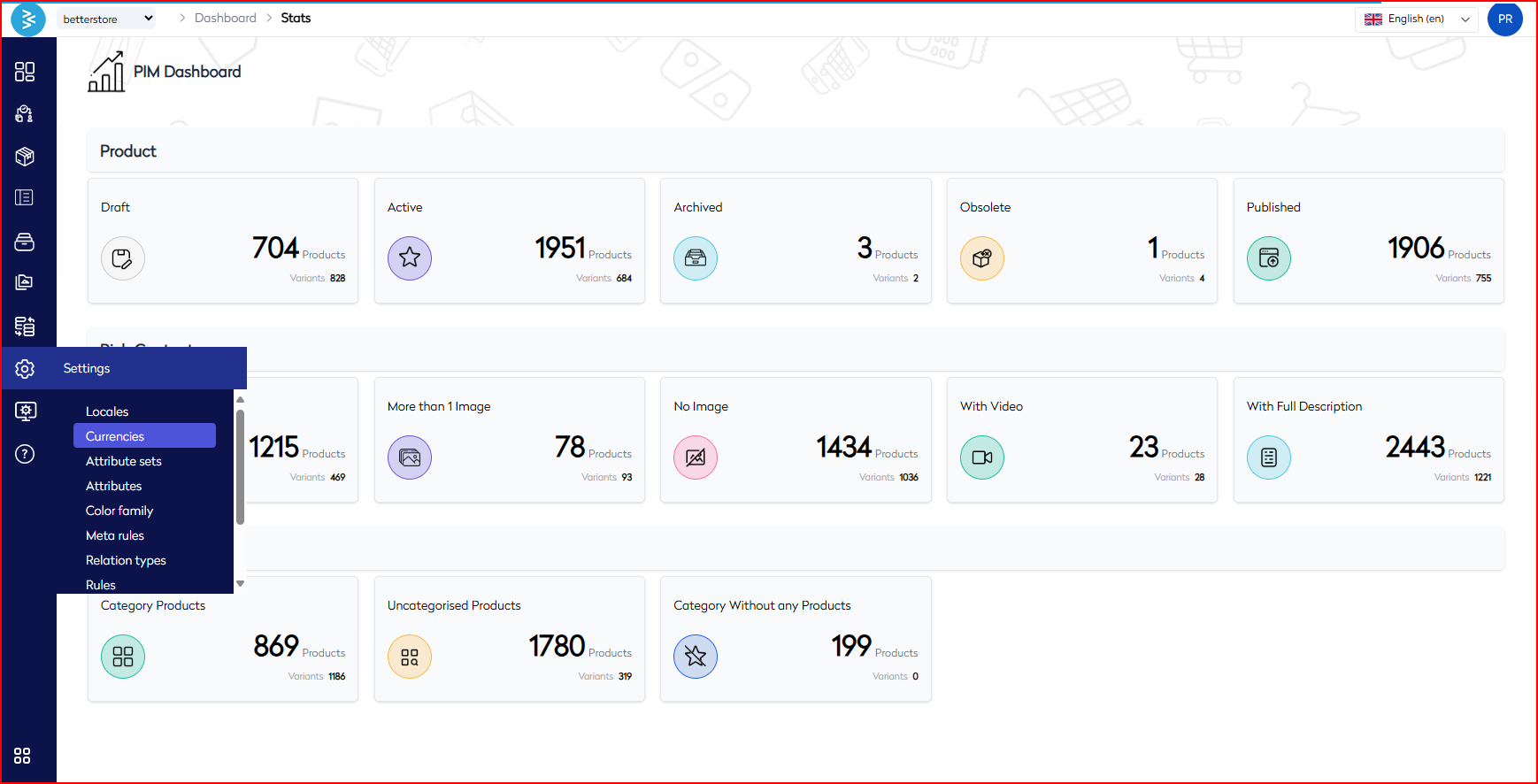
Managing Currency Settings
-
Enable or Disable Currencies
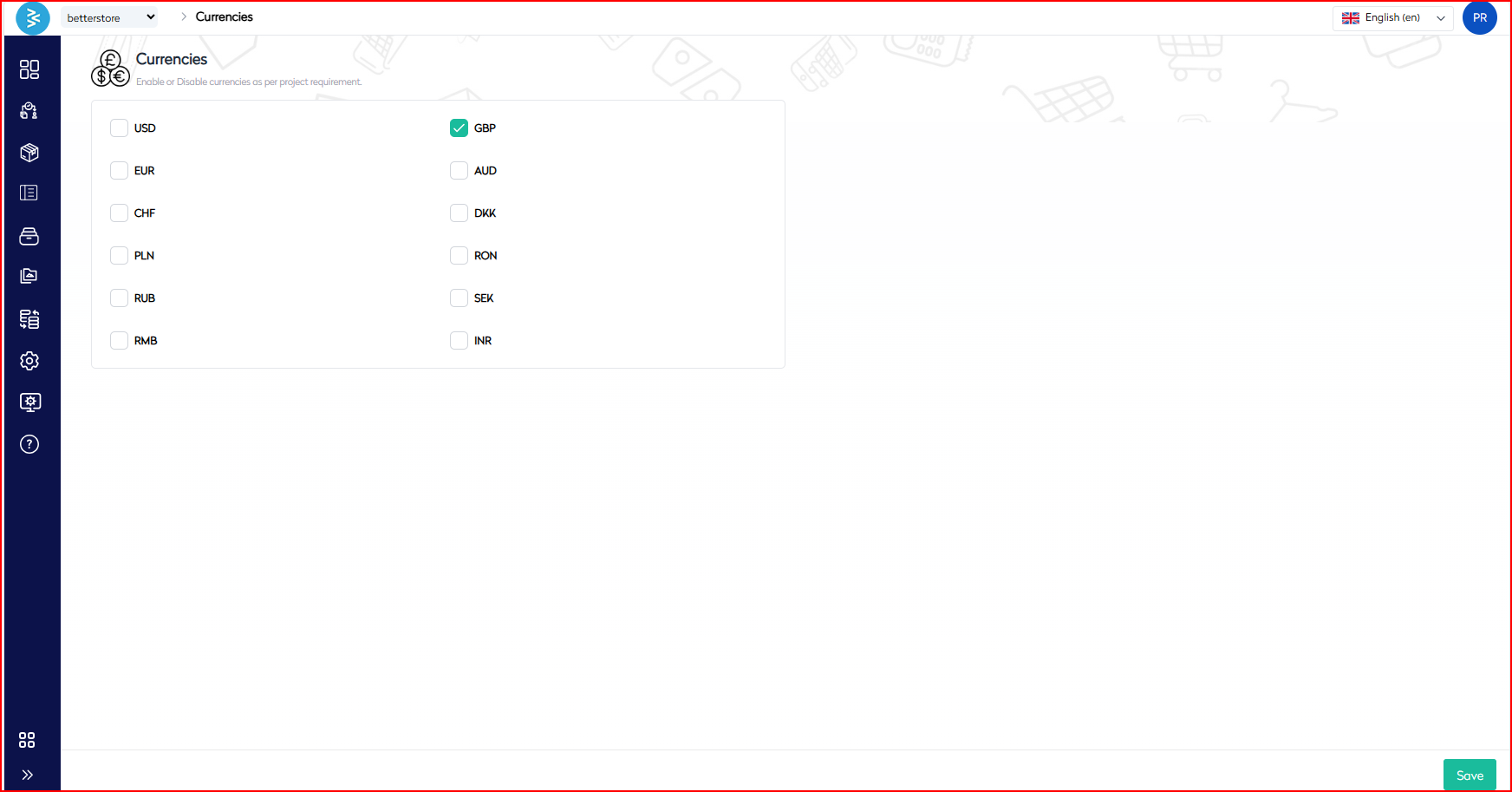
The interface displays a list of supported currencies in checkbox format. To configure currencies:- Enable a Currency: Check the box next to the desired currency (e.g., GBP, USD, EUR).
- Disable a Currency: Uncheck the corresponding checkbox to deactivate the currency.
- Click the Save button at the bottom right to apply changes.
-
Supported Currencies
The system currently supports the following currencies:-
USD – US Dollar
-
EUR – Euro
-
GBP – British Pound
-
CHF – Swiss Franc
-
PLN – Polish Zloty
-
RUB – Russian Ruble
-
RMB – Chinese Yuan
-
AUD – Australian Dollar
-
DKK – Danish Krone
-
RON – Romanian Leu
-
SEK – Swedish Krona
-
INR – Indian Rupee
Note: In the current configuration, only GBP is enabled by default.
-
Use Cases
- Regional Expansion: Activate country-specific currencies to support new market launches.
- Pricing Flexibility: Display prices in local currencies to enhance customer trust and improve conversion rates.
- Operational Control: Temporarily disable currencies not in active use to streamline operations and reduce complexity.
Best Practices
- Payment Gateway Compatibility: Enable only currencies supported by your payment gateways and financial systems to ensure seamless transactions.
- Tax and Pricing Rules: Define tax and pricing rules for each currency before activation to maintain compliance and accuracy.
- End-to-End Testing: After enabling a new currency, perform comprehensive testing to validate correct rendering on both frontend (e.g., product pages, checkout) and backend (e.g., financial reporting) systems.
Summary
The Currency Configuration feature in BetterCommerce allows administrators to manage multi-currency support by enabling or disabling currencies such as USD, EUR, GBP, INR, and others through a user-friendly checkbox interface. This ensures localized pricing, streamlined financial operations, and enhanced customer experiences across global markets. By adhering to the outlined steps and best practices, enterprise users can effectively configure currencies to align with operational and regional requirements, supporting use cases like market expansion and pricing flexibility.
For additional support, contact the BetterCommerce support team or refer to the platform’s help documentation.