
BetterCommerce - Product Information Management (PIM) – User Manual
The Product Information Management (PIM) module is the central hub for managing, enriching, and governing product data at scale. Designed for enterprises handling complex or extensive product catalogs, it ensures consistent, high-quality, and channel-ready product information across eCommerce platforms, marketplaces, print catalogs, and third-party integrations.
Core Capabilities of PIM
The PIM system supports end-to-end product lifecycle management, offering tools for data standardization, enrichment, localization, and syndication. Below are the key capabilities:
Product & Catalog Management
- Create, import, and manage products and variants using intuitive interfaces and bulk CSV imports.
- Organize collections and kits to facilitate bundled offerings or thematic product groupings.
Attributes & Metadata
- Define custom attributes and attribute sets to tailor product schemas to business needs.
- Utilize bulk import tools for efficient attribute population and updates.
Category Hierarchy
- Create and manage multi-level category trees to reflect business taxonomy.
- Associate products to categories via imports or manual tagging.
Brand & Supplier Management
- Maintain a centralized repository of brands and suppliers, enabling accurate product attribution and filtering.
- Group products under brand collections for marketing and merchandising.
Pricing Configuration
- Manage pricing rules and tiered structures for B2B and B2C scenarios.
- Import/export price lists to streamline mass updates across regions or partners.
Media & Digital Assets
- Upload and manage images, videos, and downloadable content linked to product records.
- Group assets into collections for reuse across product lines.
Product Relationships
- Configure cross-sells, upsells, bundles, and variant mapping.
- Define custom relation types based on business logic.
Localization & Globalization
- Localize product content by language, currency, and region.
- Apply localized SEO metadata to boost visibility in local markets.
Process Automation & Integration
- Set up rules, workflows, and webhooks to automate tasks.
- Connect with ERP, OMS, storefronts, or third-party platforms via APIs.
Governance & Access Control
- Enforce role-based access control (RBAC) for users and teams.
- Generate and manage API tokens for secure external integrations.
Operational Logs
- Track all import/export activities, sync logs, and batch operations to ensure transparency.
Marketing & Campaign Support
- Build and publish landing pages, curated collections, and seasonal campaigns.
Business Benefits
PIM helps enterprise teams maintain a competitive edge through:
- Centralized Data Management: A single source of truth ensures accuracy and trust.
- Operational Efficiency: Automates content updates, improves collaboration, and accelerates time-to-market.
- Channel Consistency: Guarantees consistent messaging and attributes across all sales and marketing platforms.
- Scalability: Supports large catalogs, multiple markets, and varied channel requirements.
- Enhanced CX: Quality content improves searchability, trust, and conversion.
PIM Dashboard – Executive Insight Center
The PIM Dashboard is a visual control center offering real-time visibility into product data health. It empowers stakeholders to track completeness, quality, and classification of catalog data, enabling strategic decisions and efficient resource allocation.
Ideal for merchandising, product management, and digital content teams, this dashboard facilitates continuous improvement by surfacing actionable insights.
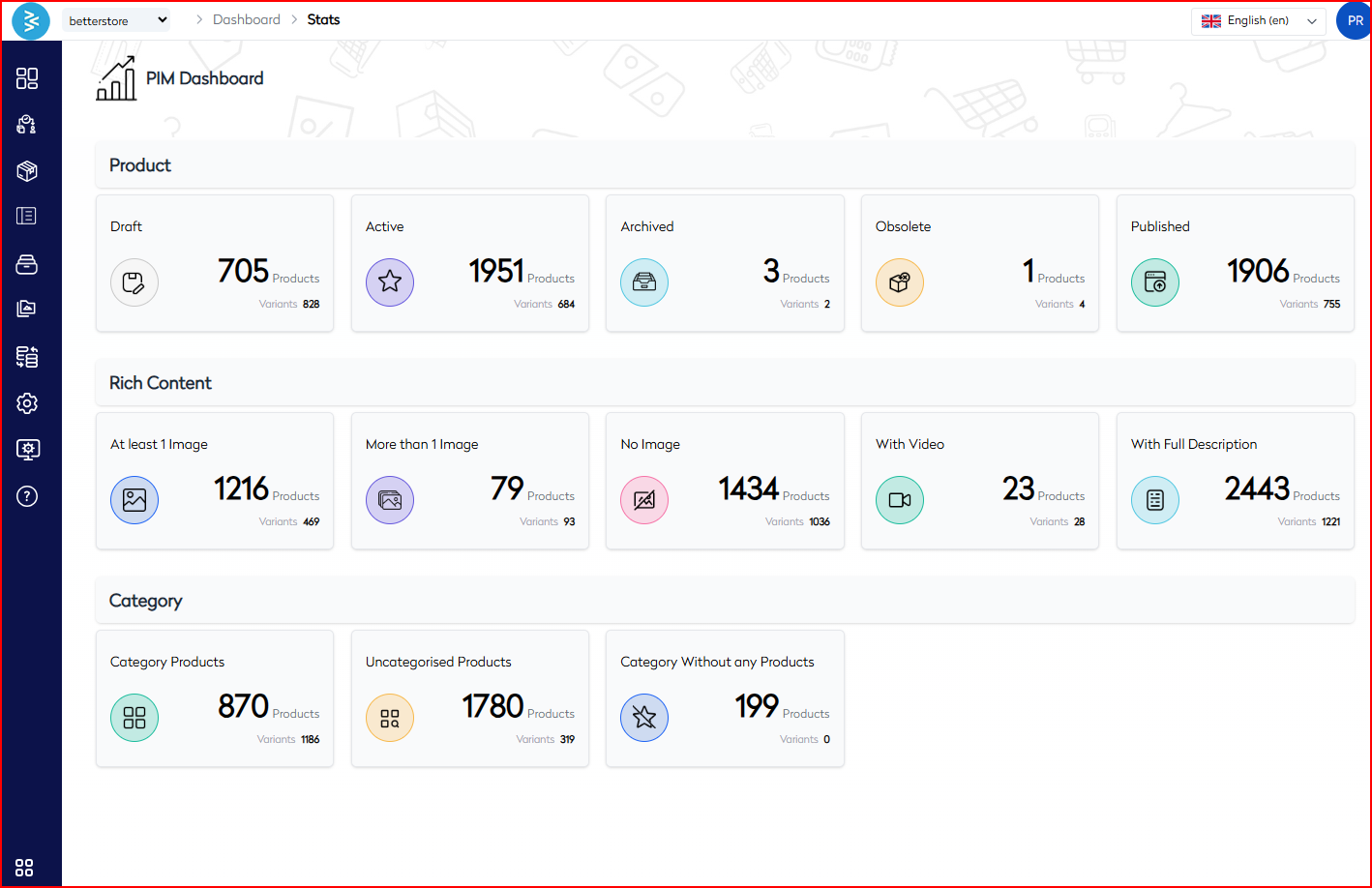
Dashboard Sections
The PIM Dashboard is organized into the following three sections:
1. Product Lifecycle Overview
This section visualizes the current status of all products across key lifecycle stages, enabling teams to monitor readiness, pipeline flow, and catalog aging.
| Status | Definition |
|---|---|
| Draft | Products under creation or review; not visible to customers. |
| Active | Published and purchasable products live across channels. |
| Archived | Removed from active catalog but retained for history or audit purposes. |
| Obsolete | Products no longer valid or available for sale, flagged for deprecation. |
| Published | Products approved and successfully pushed to frontend channels or marketplaces. |
2. Rich Content Analytics
This segment evaluates the visual and descriptive depth of content per product, identifying quality gaps that may impact discoverability or user experience.
| Metric | Definition |
|---|---|
| At least 1 Image | Products that include one or more images. |
| More than 1 Image | Products enriched with multiple images for enhanced presentation. |
| No Image | Products lacking any image; represents a critical content deficiency. |
| With Video | Products embedded with video assets for enhanced storytelling or demos. |
| With Full Description | Products that include a complete, SEO-friendly product description. |
3. Category Classification Insights
Categorization accuracy impacts navigation, SEO, and user journeys. This view helps maintain structured catalogs and reveals organizational gaps.
| Metric | Definition |
|---|---|
| Category Products | Products correctly linked to one or more defined categories. |
| Uncategorised Products | Products missing category assignment, risking poor navigation or search exclusion. |
| Category Without Products | Categories that currently hold no products and may require deprecation. |
Strategic Use Cases
The dashboard is instrumental for:
- Content Quality Control: Identifying and fixing products with missing visual or descriptive data.
- Product Lifecycle Management: Monitoring product transitions from draft to published state.
- Catalog Optimization: Auditing uncategorized or unassigned records to improve taxonomy.
- Operational Reporting: Supporting decision-making with real-time performance indicators.
Best Practices
- Implement Weekly Dash Reviews: Include dashboard insights in content team stand-ups or sprint retros.
- Prioritize Image & Description Gaps: Start enrichment workflows for products missing key content.
- Validate Category Mapping: Regularly reconcile category-product links to prevent orphaned SKUs.
- Audit Obsolete Products: Periodically clean out legacy or deprecated items to streamline operations.
- Align Active vs Published Counts: Ensure backend and storefront product visibility match.
The PIM Dashboard acts as the heartbeat of digital product readiness—providing continuous insight to ensure high-quality, complete, and properly structured product information across all customer touchpoints.